New Release 1.12 | Vario One Watch App saves flights to the Flight Logbook
The Watch App saves flights to the Flight Logbook
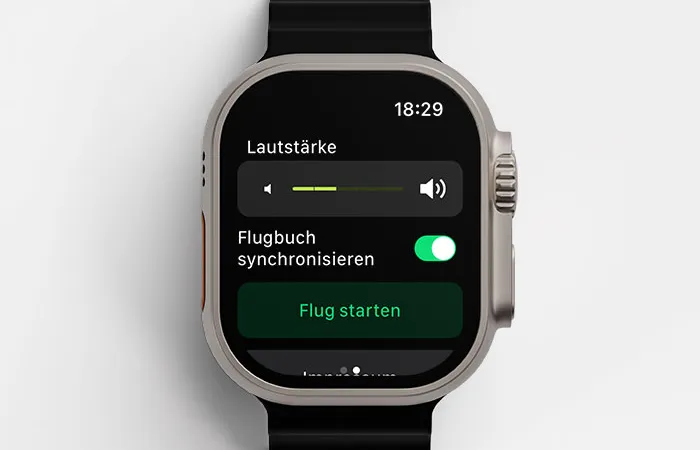
Release 1.12 could have also been called Version 2.0 – that’s how significant this new feature is. From now on, the Apple Watch saves your flights independently to the Flight Logbook, entirely without an iPhone.

Before: Flight Logbook only with iPhone
In previous versions, flights were only recorded in the Flight Logbook when you had your iPhone with you. But many pilots fly with only the Watch on their wrist – and for exactly those pilots, everything changes now.
Now: Watch records independently
The Apple Watch now records your flights autonomously and saves them to the same Flight Logbook as the iPhone:
- Watch alone – flights are saved directly on the Watch
- iPhone alone – works as usual
- Both devices – all flights end up in the same unified logbook

Setup in a few steps
The setup is intentionally kept simple:
- Swipe from right to left in Vario mode
- Confirm your email address
Important: Use the same email address on all devices. This keeps your Flight Logbook consistent – whether you fly with the Watch or the iPhone.
New iPhone or new Watch?
When you get a new device, the transition is effortless:
- Download Vario One on the new device
- Activate the toggle and confirm your email
All flights sync automatically. Nothing is lost – your entire Flight Logbook moves with you.
Technical background
Technically, the solution is based on a local database directly on the Watch:
- Stable storage – even when the connection to the iPhone is interrupted
- Reliable – flights are not lost, even with connection issues
- Foundation for extensions – this database enables exciting features in future versions
What comes in the next version will be a special surprise. More on that soon.