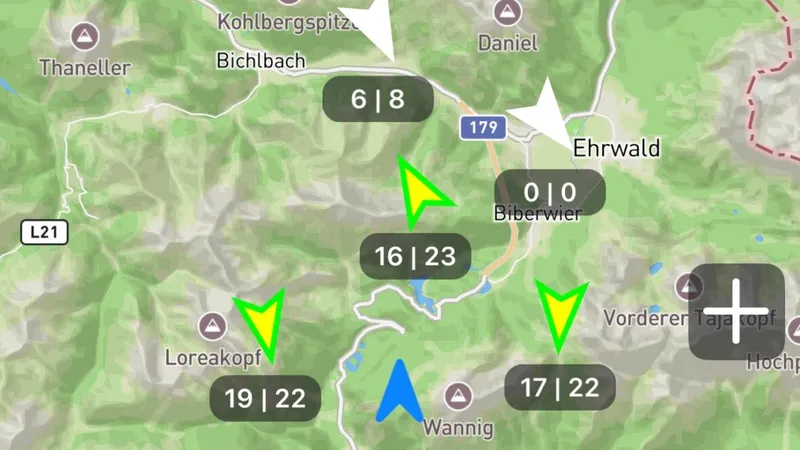
New Release 4.0 | New map feature with wind stations, thermal display and airspace maps
New map feature – everything at a glance
Release 4.0 brings a completely new map feature to Vario One. Topographic maps, real-time wind data, airspaces and thermal hotspots – all combined in a single, clear view.
This update changes the way you plan and execute your flight – from the ground to the air.
1. Topographic and satellite maps
The map offers two display modes:
- Topographic map – with contour lines, terrain details and slope gradients. Ideal for flight planning and identifying thermal triggers.
- Satellite view – for a realistic look at the terrain. Particularly useful for assessing landing spots, forests and buildings.
Setting a pin
By long-pressing on the map you can set a pin to mark important points:
- Planned takeoff site
- Destination or waypoint
- Alternative landing spot
- Meeting point with retrieve driver
2. Integrated instruments on the map
During flight, the most important instruments are displayed directly on the map. You don’t need to switch between screens:
- Altitude – your current flight altitude in meters
- Speed – your ground speed
- Climb/sink rate – current vario value in m/s
Red wind arrow
At the edge of the map, a red wind arrow shows the current wind direction and strength. This gives you all relevant data at a glance – map, instruments and wind in one view.
3. Holfuy wind stations worldwide
Vario One displays Holfuy wind stations directly on the map. Holfuy operates weather stations at flying sites around the world. The data is updated every 10 minutes and shows you:
- Current wind speed in km/h
- Wind direction as an arrow on the map
- Gusts – maximum wind speed in the measurement interval
This is particularly valuable:
- Before takeoff – what are the current conditions at the launch site?
- In the air – how is the wind developing at other stations?
- In unfamiliar areas – what conditions prevail at a flying site you’ve never visited?
4. Airspaces from Open AIP
The airspace display is based on data from Open AIP and is shown directly on the map:
- Control zones (CTR) – color-coded and recognizable at a glance
- Restricted areas – clearly delineated so you can avoid them
- Danger zones – with information on activation times
- Other airspaces – TMZ, RMZ and other relevant zones
This allows you to plan your flight route without accidentally entering restricted areas. Airspaces are displayed directly over the topographic map, so you see terrain and airspace boundaries simultaneously.
5. Thermal heatmap (KK7)
The KK7 thermal heatmap shows you areas where pilots have found good thermals in the past:
- Based on thousands of flights worldwide
- Displayed as a colored overlay on the map
- Warm colors (red/orange) = strong thermals
- Cooler colors (yellow/green) = weaker updrafts
This is particularly valuable when you:
- Are exploring a new flying area
- Want to optimize your cross-country flights
- Are looking for thermal triggers on unfamiliar slopes
Everything together – the full picture
The combination of all five layers makes Vario One 4.0 a comprehensive planning and flight instrument:
- Topographic map for terrain details
- Integrated instruments for real-time data in flight
- Holfuy wind stations for current wind conditions
- Open AIP airspaces for safe route planning
- KK7 thermal heatmap for the best thermal areas
Plan your flight on the ground. Execute it in the air with all relevant information.